Simulations
Gravity.jl allows one to carry out simulations using the same format of the YAML configuration file normally used for model fitting.
Simulations are activated with scheme: simulation. All other parts of the configuration file can be kept. The simulation mode is, in many respects, very similar to the scheme: extended-imageplane: that is, all source parameters are considered and included in the parameter vector. Additionally, since in a simulation one generally does not know a-priori the positions of the images associated to each source, it is a good idea to explicitly include a grid.
Two new commands control the generation of simulated images. They are Main.model.make_simulations and the related Main.model.flat_simulations. They respectively return a dictionary or a list of images produced by the gravitational lensing configuration associated with the provided parameters. One important point, is that these commands generate observations with random statistical errors: therefore, multiple successive calls of these functions with the same arguments will return different results.
The errors are distributed accordingly to the specified image section. More specifically, the functions produce errors that will follow, in sequence for each source, the error distributions specified in the various images: therefore, if four images are indicated in the configuration file, but only two images are predicted, the errors will be distributed using the errors of the two images. In case more images are predicted than the ones listed in the configuration file, the distribution of the last image is used for the exceeding ones.
Example
parameters:
    angular_unit: 1
    z_lens: 0.6423
    wcs_origin: (0.0, 0.0)
lens-inversion:
    failsafe: always
    grid: (-10:0.01:10, -10:0.01:10)
    methods:
        newton:
            maxiters: 100
            xtol: 1e-4
            ftol: null
        success:
sampling:
    scheme: simulation
    algorithm: pt
    random-seed: 1
lenses:
    - NIS:
        name: L1
        z: z_lens
        x: (-1.0, -1.0)
        s: 0.02
        σ: 200
    - NIS:
        name: L2
        z: z_lens
        x: (1.0, -1.0)
        s: 0.02
        σ: 200
    - NIS:
        name: L3
        z: z_lens
        x: (1.0, 1.0)
        s: 0.02
        σ: 200
    - NIS:
        name: L4
        z: z_lens
        x: (-1.0, 1.0)
        s: 0.02
        σ: 200
sources:
    - Point:
        z: 1.689
        x: (0.0, 0.0) ± 0.2
        images:
            - Point:
                x: (0.0, 0.0) ± 0.01
The model above has free parameters only associated with the source (the $x$ and $y$ coordinates of the source position), but in general one might also include parameters associated with the lenses or the cosmological model, as in any other configuration file.
If one runs then
julia> model = gravitymodel("examples/simulation/simulation.yml")
Main.GravityModel

julia> model.flat_simulations([0.1, 0.1])
OrderedCollections.OrderedDict{String, PointImageMeasurement{Float64}} with 11 entries:
  "sources_1_Point_simulations_1"  => PointImageMeasurement{Float64}([0.410292, 0.41101], [10000.0 0.0; 0.0 10000.0], 7.37246)
  "sources_1_Point_simulations_2"  => PointImageMeasurement{Float64}([1.05161, -1.65546], [10000.0 0.0; 0.0 10000.0], 7.37246)
  "sources_1_Point_simulations_3"  => PointImageMeasurement{Float64}([-1.3494, -1.35027], [10000.0 0.0; 0.0 10000.0], 7.37246)
  "sources_1_Point_simulations_4"  => PointImageMeasurement{Float64}([-1.00726, -0.99563], [10000.0 0.0; 0.0 10000.0], 7.37246)
  "sources_1_Point_simulations_5"  => PointImageMeasurement{Float64}([0.993632, -1.0095], [10000.0 0.0; 0.0 10000.0], 7.37246)
  "sources_1_Point_simulations_6"  => PointImageMeasurement{Float64}([2.0003, 0.410325], [10000.0 0.0; 0.0 10000.0], 7.37246)
  "sources_1_Point_simulations_7"  => PointImageMeasurement{Float64}([-1.00409, 1.00108], [10000.0 0.0; 0.0 10000.0], 7.37246)
  "sources_1_Point_simulations_8"  => PointImageMeasurement{Float64}([1.00434, 0.999732], [10000.0 0.0; 0.0 10000.0], 7.37246)
  "sources_1_Point_simulations_9"  => PointImageMeasurement{Float64}([-1.68338, 1.03757], [10000.0 0.0; 0.0 10000.0], 7.37246)
  "sources_1_Point_simulations_10" => PointImageMeasurement{Float64}([1.59038, 1.60052], [10000.0 0.0; 0.0 10000.0], 7.37246)
  "sources_1_Point_simulations_11" => PointImageMeasurement{Float64}([0.423186, 2.00879], [10000.0 0.0; 0.0 10000.0], 7.37246)
Note how several (11) images are produced, all with the same error distribution, taken from the only image present in the configuration file.
With the usual Makie visual interface we can display the lensing configuration:
julia> using CairoMakie

julia> fig = Makie.Figure(size=(800, 400));

julia> ax1 = Makie.Axis(fig[1, 1]; aspect=Makie.DataAspect(), xgridvisible=false, ygridvisible=false, title="Image plane")

julia> plotmodel!(ax1, model, [0.1, 0.1])

julia> ax2 = Makie.Axis(fig[1, 2]; aspect=Makie.DataAspect(), xgridvisible=false, ygridvisible=false, title="Source plane")

julia> plotcaustics!(ax2, model, [0.1, 0.1])

julia> plotsources!(ax2, model, [0.1, 0.1])

julia> fig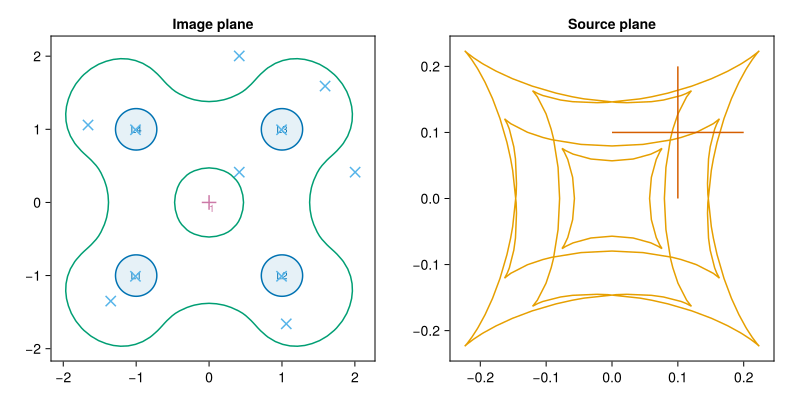
API Interface
Main.model.make_simulations — Function
make_simulations([rng=default_rng(),] x [, options, sys])Simulate image observations associated to the parameters x.
This function is similar to make_predictions, with the important difference that it returns randomly generated images. The generated images will be distributed with averages following the predictions (as given by make_predictions), and with scatters equal to the scatters of the images as entered in the configuration file. If more images than the ones entered in the configuration file are predicted, the scatter of the last image is replicated.
rng is an optional Random.AbstractRNG used to draw random statistical errors for the simulation.
This function ignores all passed keywords: in particuar, it does not take into account the matches keyword, and just returns all predicted images found, with no duplicates. Please use flat_predictions with matches=:best to select the best-matching prediction associated with each image.
See also: make_sources, make_images, make_predictions
Main.model.flat_simulations — Function
flat_simulations([rng=default_rng(),] x [, prop1, prop2...]; matches=:best, tolerant=false)Return a (flat) dictionary with all predicted sources in the model.
x is a vector with the free parameters, as specified in the setup file.
rng is an optional Random.AbstractRNG used to draw random statistical errors for the simulation.
The other optional arguments can be used to extract specific properties from the predicted images: they must be symbols corresponding to the properties desired.
The two keywrods matches and tolerant modify the behaviour of this function. If matches=:all, the function returns all predicted images, regardless of the observed ones. In this case the names of the predicted images are modified to end in prediction_n, where n is a running integer. The default setting, matches=:best, associated to each image the closest prediction. In this case, if tolerant=true the function silently ignores images for which the lens inversion procedure failed.
See also: flat_sources, flat_images, flat_diffs, flat_lenses.