WCS and Data Sections
World Coordinate System
The analysis of extended sources requires that the user specified the sky coordinates corresponding to the default grid, that is the normal coordinates used for point-like sources. The scale of this grid can be set with the special angular_unit parameter. However, for extended sources this is not enough, since we need to localize the coordinate grid in the sky. This task can be carried out in two different ways:
If the grid is oriented along the equatorial coordinates, so that the x axis is along the right ascension and the y axis along the declination, one can just specify the origin of the global coordinate system, i.e. the right ascension and declination of the point with global coordinates
(0, 0). This task can be done by using thewcs_originparameter.Alternatively, one can specify the full coordinate system with a special
wcssection in the configuration file, as explained below.
A typical WCS section might appear as
wcs:
    crpix: [0.0, 0.0]
    crval: [64.038142, -24.067472]
    cdelt: [-0.0002777777777777778, 0.0002777777777777778]
    ctype: ["RA---TAN", "DEC--TAN"]
As shown here, essentially this section replicate the WCS header of a FITS file. The accepted parameters are: crpix, crval, cdelt, ctype, cunit, cd, pc, equinox, latpole, lonpole, radesys. The cd and pc parameters are 2×2 matrices, while the others are 2-element vectors. Additional accepted scalar parameters are equinox, latpole, lonpole, radesys.
For a meaning of these parameters please see the Mark Calabretta's WCS page. Note that Gravity.jl uses a fast Julia implementation of the WCS library, which however accepts only tangential (TAN) projections.
Alternatively, one can instruct Gravity.jl to use the same WCS present in a FITS image. To this purpose, one can just provide the FITS filename in the WCS specification:
wcs: myimage.fitsThis can be useful to be able to use pixel coordinates in the configuration file. For example, one could produce a catalog of sources in the file myimage.fits using a software such as SExtractor, and use then directly the X_IMAGE and Y_IMAGE values obtained from the SExtractor catalog for the image positions. See also the section Conversions functions and constants.
Datasets
Extended sources also require one or more datasets. A dataset stores essential data associated to observed extended images, such as their surface brightness and the associated uncertainties.
More specifically, a dataset is defined in the data section of the configuration file:
data:
    r-band:
        image: flux.fits
        ivar: flux-ivar.fits
        mask: mask.fits
        psf: psf.fits
        oversampling: 2
        clans:
            arc: [1, 2, 4]
The section defines one or more datasets: in our case, we have just one dataset called r-band. Each dataset includes a number of keywords, described in details below. Many of them, are associated to external FITS files.
Alternatively, instead of an external file one can request the use of a global variable, using the usual format Module.var"name", where Module is the module holding the global variable named name. If Module is omitted, the variable will be searched in Main module (which is the one usually used in the interactive command-line REPL). The global variable should be a tuple such as (header, data), where header is a string associated to the FITS file header and data is an array. If header is omitted, a minimal header compatible with data is used: note that, in this case, no WCS information can be associated to the array, and therefore this format should not be used for the image keyword (see next section.)
image
This compulsory keyword is used to specify a FITS file containing the image flux (surface brightness). The FITS file should have a valid WCS header, needed to locate the image in the sky as to associate each pixel to a sky position. If this is missing, one can specify the WCS parameters in a wcs section the dataset (see below).
ivar, var, or err
The inverse variance of the image is stored in the FITS file specified with this compulsory keyword. Alternatively, one can provide a variance map or an error map, using the fields var or err, respectively. It is an error to specify more than one of these three fields for a dataset. The associated FITS file must have a size identical to the image one.
Instead of the name of a FITS file, one can provide for any of these fields a fixed number: in this case, the corresponding map is taken to be constant for the whole image.
mask
A single dataset can be used to store data associated to different images (even images belonging to different family, i.e. associated to different sources). In order to disentangle different images, one can use a mask, i.e. a FITS file containing only integer values. The mask is a little like a segmentation map: pixel belonging to different images will be flagged with different integers in the mask. Conventionally, a vanishing value is used to mark a pixel that does not contain any source.
Note that overlapping objects should mark appropriately the overlapping area: for example, one could have a mask like the following:
0  0  0  3  0  0  0
0  0  3  3  0  0  0
0  3  6  6  0  0  0
0  3  3  5  5  0  0
3  3  0  0  5  5  0
0  0  0  0  0  0  0
where the object 3 overlaps with the object 5 in an area marked with 6. Note that, as in the example above, one does not need to use bitmasks to mark the various objects. In the definition of the various images, then, one will just provide the mask values (maskids) as a list of values (this [3,6] and [5, 6] in our case).
psf
A FITS image containing the point spread function (PSF) to be used with the given dataset. If not specified, no PSF convolution will be performed. If specified it has to be an odd multiple of the oversampling parameter (or just an odd number if oversampling is unspecified). The PSF is taken to be centered at the center of the FITS file.
Alternatively, one can specify here a Julia expression that, when evaluated, produces a matrix (or an OffsetMatrix) representing the PSF. As an example, one could use
psf: exp.(-((-3:3).^2 .+ (-2:2)'.^ 2) ./ (2*1.5^2))to create a 7×5 Gaussian PSF with standard deviation of 1.5 pixels. Note the use of the dotted operators to broadcast the expression. The same PSF can be specified with the @. "dot call" macro, but in that case quotes are required to avoid a YAML error:
psf: "@. exp(-((-3:3)^2 + (-2:2)'^2) / (2*1.5^2))"The use of centered ranges expression above (-3:3 and -2:2) to ensure that the PSF is centered at its peak, as typically required.
Notice that the expression cannot make use of any parameter or constant defined in the configuration file.
Regardless of the method used to specify the PSF, the PSF will always be normalized to unity, so that the flux will be conserved.
wcs
If the WCS of the image is missing, or if one wishes to replace it, it is possible to specify explicitly the WCS to use. This can be done using a wcs: subsection of the dataset, where the relevant keywords are indicated (much similarly to the wcs section of the full configuration file described above).
oversampling
A single odd integer, or a tuple of two odd integers. It can be used to specify that surface brightness computations need to be performed with a given oversampling: that is, each pixel is divided into oversampling sub-pixels (in both horizontal and vertical directions) and all computations are done at the sub-pixel level. The final result is then obtained by combining all sub-pixels into the original pixels (with or without PSF convolution, depending on the presence of the psf keyword).
clans
In presence of non-parametric extended sources, the user needs to specify the mask IDs that needs to be modeled jointly. To the very least, one will need to indicate here the mask IDs of images produced by the same source, i.e. the mask IDs of an image family. However, if two or more images belonging to different families overlap (even partially as a result of the PSF smearing), they will need to be included in the same clan, as the modeling will be carried out jointly. Note that a clan can span more than one dataset: in this case the clan name will be used in two or more data sections. Note that, implicitly, a clan is intended to be used for homogeneous datasets (in particular, based on the same passband).
Interpolation kernels
The use of external images in datasets is often associated to the need to interpolate the data. For example, when using pixelated extended sources, one will need to specify the interpolation method used for the source, as in general pixels in the images will not be mapped to exact pixel positions in the source.
Interpolation in Gravity is performed using suitable kernels. The code has been derived InterpolationKernels.jl, to which we refer for a detailed documentation, but has been almost completely rewritten to make it suitable for Gravity. The accepted kernels are described in the following subsections.
In general, one will need to use interpolation kernels for coordinates in the plane. In Gravity we consider separable kernels, i.e. kernels that can be written as a product of a function of x and one of y. The two kernels associated to x and y can be entered as a tuple, as in (BSpline{2}(), BSpline{4}()). More often, however, one will just indicate a single kernel, which will be used for both coordinates (e.g., BSpline{2}()).
B-Spline: BSpline{N}()
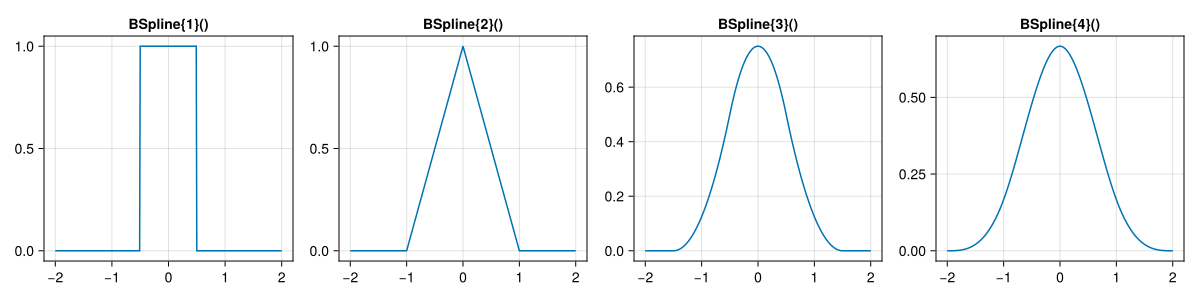
The basis spline, or B-Spline, is a low-degree polynomial interpolation with minimal support. To select this interpolation, just enter BSpline{N}(), where N - 1 is the kernel degree. In particular N = 1 corresponds to the nearest neighbor, N = 2 to a linear interpolation, and so on up to N = 4 for a cubic interpolation.
The support of these kernels, i.e.\ the length of the interval where the kernel is non-zero, is N.
The shapes of the kernels of various degrees is shown in the figure below.
Cubic Spline: CubicSpline(a, b)
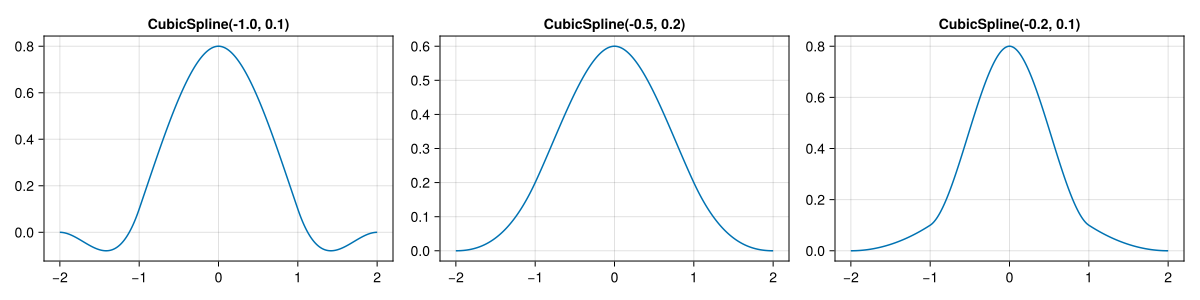
Interpolation kernels in Gravity are defined as cubic Spline. The parameters a and b represents the derivative and the value of the kernel at unity; the support is always 4. Depending on the values of these two parameters we can reproduce other kernels described below:
CubicSpline(-1/2,1/6)is equivalent toBSpline{4,T}();CubicSpline{T}(a,0)produces a cardinal cubic spline and is equivalent toCardinalCubicSpline(a);CubicSpline{T}(-1/2,0)produces a Catmull-Rom kernel equivalent toCatmullRomSpline().
Cardinal Cubic Spline: CardinalCubicSpline(a)
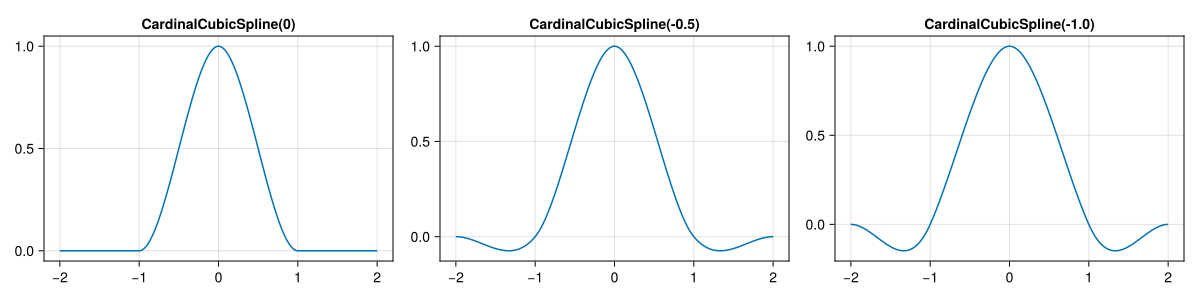
A special case of cubic splines with b = 0. This implies that the kernel vanishes for all integer values except zero and is unity in zero. As for more general cubic splines, the support is 4.
Catmull-Rom Spline: CatmullRomSpline()
A special case of cardinal splines with a = 1/2.
Lanczos kernel: LanczosKernel{N}()
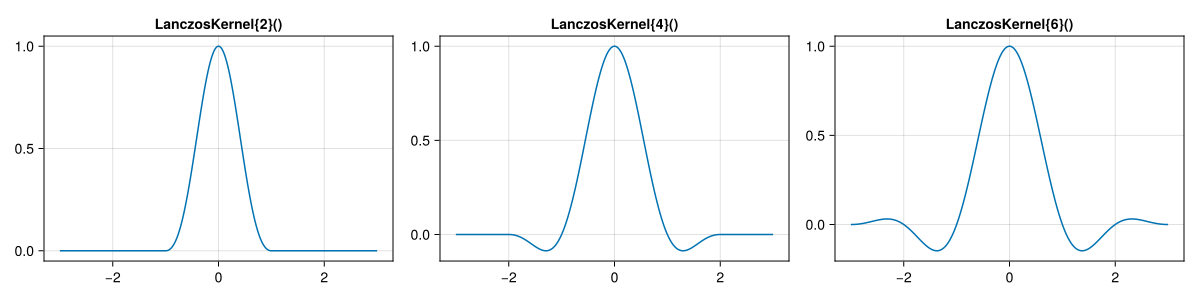
A set of kernels specifically designed for resampling low-resolution data. The parameter N must be a positive even number. Its support is N. This kernel is often used with N = 2 or N = 4 to avoid large supports.