Grids
The grid system implemented in Gravity is based on a simple idea, the use of regular, rectangular grids. However, the system also various advance features:
Grid coordinates. A grid is associated to a reference point and to the element width and height (that is, the grid steps along the two axes). This way we can always identify the coordinates of the center and of the corners of a grid element.
Masking. A grid is associated with a mask which identifies the elements of the grid that are effectively used.
Sub-grids. In some cases we need to work with a set of relatively fine grids that are part of a large field: this happens, for example, when we want to describe the multiple images of an extended source. This is implemented with a parent-child relationship between grids (see
Gravity.subgrid).Oversampling. Grid can use oversampled cells: in this case, all original cells as defined in the grid mask are divided into an arbitrary number of subcells. This is useful to perform quickly operations similar to antialiasing in graphics.
Refinements. Parts of a grid can refined; that is, specific grid elements can be split into four sub-elements. This operation can be repeated in arbitrary ways, so that certain sub-elements are further split (and so on). This is useful in various situations where one needs something similar to an oversampling but only for specific regions of a grid, which could happen, for example, near the critical lines of a lens system.
Example
As an example, consider the grid created from the following mask
julia> mask = Bool[1 1 0; 0 1 1];

julia> grid = Gravity.MaskedGrid(mask, SPoint(0.0, 0.0), SPoint(1.0, 1.0));
The resulting grid can be easily displayed using the Makie extension:
julia> using CairoMakie

julia> Gravity.plotgrid(grid)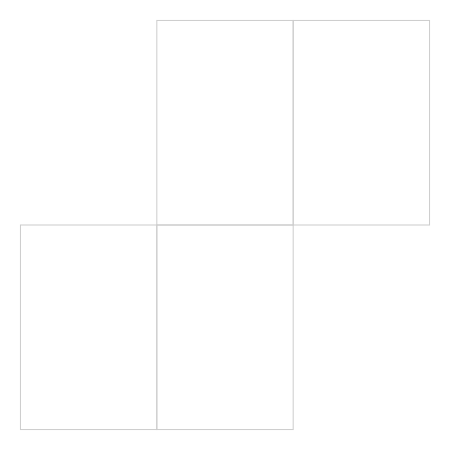
We can then refine, say, the grid cells 2 and 3:
julia> Gravity.refine_grid!(grid, [2, 3]);

julia> Gravity.plotgrid(grid)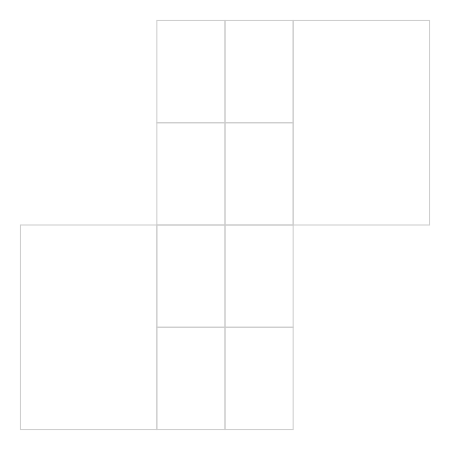
We can finally further refine, say, the grid cells 7, 9 and 10:
julia> Gravity.refine_grid!(grid, [7, 9, 10]);

julia> Gravity.plotgrid(grid)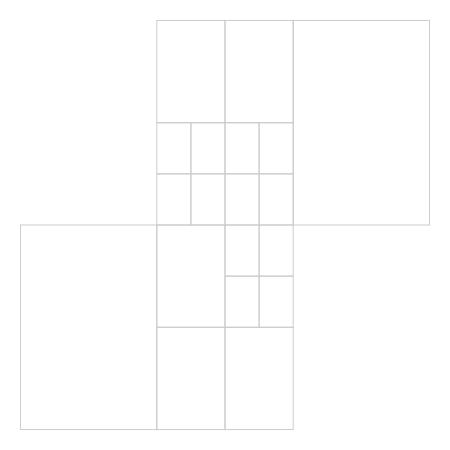
General geometrical method
Gravity.isinside — Function
isinside(point, corners)Check if point is inside the polygon identified by corners.
This procedure just checks the number of crossing between the polygon's sides and the ray originating from the point and going to the right. It works for both clockwise and anticlockwise corners.
Grid methods
Grid definition and main properties
Gravity.AbstractGrid — Type
Gravity.BasicGrid — Type
BasicGrid{T} <: AbstractGrid{T}A simple grid, equivalent to two ranges along x and y.
I can be created with a command such as BasicGrid(-3.0:0.1:3.0, -2.0:0.1:2.0), i.e. by specifying two ranges. It is mostly used in contexts where one does not need any refinement or more advanced options (as for grids with GPUs).
Members
xrange: aStepRangeLenalongxyrange: aStepRangeLenalongy
Gravity.MaskedGrid — Type
MaskedGrid{T} <: AbstractGrid{T}An irregular two-dimensional grid built from a mask, using type T.
Members
In the following, we call M the original number of unmasked points, R the number of refined points, and C the number of (refined) corners.
super_idx: a vector ofMindexes pointing to the super grid. This field is relevant only when multiple grids are combined together inside a super-grid; seesubgrid.mask: the original (possibly oversampled) mask, recorded as a matrix of integers: 0 indicates a masked point, and the various (unique) positive integers are used to index the unmasked point (so that, a point with a givenidx = mask[x, y]will have its coordinates stored incenters[idx])ref: the coordinates of the center of the reference point, corresponding to the point atmask[1, 1]inv_mask: a (dense) 2×M matrix of integers: the pixel withcenter[i]will correspond to the mask pointmask[inv_mask[1:2, i]...]; therefore, for anyi,mask[inv_mask[1:2, i]...] = i, i.e.inv_maskis the inverse ofmaskcenters: a vector of RSPoint's, with the coordinates of the centers of each pixel in the grid. Note that when a grid is refined, the centers of the refined points are not deleted: rather, theirlevelsare set to negative values and theirareasare also set to negative values.corners: a vector of CSPoint's, with the coordinates of the corners within the mask or at the borders of the mask. This array is longer thancenters.corners_idx: a vector of R static quadruplets: the pixel withcenter[i]will have corners at the coordinatescorners[corners_idx[i]]. The indexes are entered in the order bottom-left, bottom-right, top-right, top-left.neighbors_idx: a vector of Rnptsquadruples giving, for each point id, the ids of the neighboring points within the mask at the same resolution, or 0 if no neighbor is present; each quadruplet stores in order the top, right, bottom, and left neighbor.children_idx: a vector of length R that gives, for each refined center, the id of the bottom-left refinement. An unrefined point with unrefined neighbors has this id set to 0; an unrefined point with at least one refined neighbor has this id set to -1.levels: a vector of length R of typeInt8representing the refinement level of each (sub)pixel: that is, the point atcenter[i]will havelevel[i]as refinement level. Initially all points will havelevel = 1; points obtained from refinements will havelevel > 1; the old refined points (no longer used) will have a negative level, corresponding to the refinement step (so for example the first refined points will havelevel = -1).As: a vector of 2×2 static matrices, representing the linear transformations from grid to pixel coordinates at each level. The length of this vector corresponds to the maximum level of the grid: therefore if length(As) == 1, the grid is unrefined.areas: a vector of length R that provides, for each pixel, its area. This is often constant for rectangular grids, but can change if the grid is not rectangular or if there are sub-grids. Refined and no longer used points haveareas < 0.mask_idx: a vector of length R that provides, for each pixel, the mask id the pixel belongs to. This originally is something likecollect(1:length(centers)), but will change as soon as the grid is refined.oversampling: a positive integer indicating the oversampling operated on the original mask. This value indicates the strategy used to assign the centers, as oversampled grids will have oversamples of a grid cell saved consecutively. An un-oversampled grid will haveoversampling = 1
Gravity.MaskedGrid — Method
MaskedGrid(mask [, ref, A] [, oversampling])
MaskedGrid(mask [, ref, δ] [, oversampling])
Create a MaskedGrid using the given mask.
The ref parameter, an SPoint, provides the position of center of the pixel mask[1,1] and, by default, is SPoint(1.0, 1.0); A, an SPointMap, indicates the transformation matrix from grid to cartesian coordinates: that is, the grid centers will be located at coordinates cᵢ = A*nᵢ + ref, where nᵢ is couple of non-negative integers representing the grid cell, and cᵢ is the corresponding grid center. Alternatively, one can specify δ, another SPoint, the step-size of the mask points: this is equivalent to the use of a diagonam matrix A. The default is to have the identity as A.
The parameter mask can either be a boolean array or an array of non-negative integers. In the latter case, the passed mask will be interpreted as a supergrid and the provided positive mask values will be stored in the super_idx attribute of the result.
Examples
julia> mask = Bool[1 0; 1 1; 0 1];

julia> grid = Gravity.MaskedGrid(mask, SPoint(0.0, 0.0), SPoint(1.0, 1.0));

julia> grid.centers
4-element Vector{SVector{2, Float64}}:
 [0.0, 0.0]
 [1.0, 0.0]
 [1.0, 1.0]
 [2.0, 1.0]

julia> grid.corners
10-element Vector{SVector{2, Float64}}:
 [-0.5, -0.5]
 [0.5, -0.5]
 [1.5, -0.5]
 [-0.5, 0.5]
 [0.5, 0.5]
 [1.5, 0.5]
 [2.5, 0.5]
 [0.5, 1.5]
 [1.5, 1.5]
 [2.5, 1.5]

julia> grid.inv_mask
2×4 Matrix{Int64}:
 1  2  2  3
 1  1  2  2

julia> all(i -> grid.mask[grid.inv_mask[:, i]...] == i, 1:4)
true

julia> grid.corners_idx
4-element Vector{SVector{4, Int64}}:
 [1, 2, 5, 4]
 [2, 3, 6, 5]
 [5, 6, 9, 8]
 [6, 7, 10, 9]

julia> grid.neighbors_idx
4-element Vector{SVector{4, Int64}}:
 [0, 2, 0, 0]
 [3, 0, 0, 1]
 [0, 4, 2, 0]
[0, 0, 0, 3]Gravity.MaskedGrid — Method
MaskedGrid(xrange, yrange [, rot=0.0] [, oversampling=1])Create a rectangular grid using a given xrange and yrange.
The result is a MaskedGrid, but in reality the grid is not masked, and is built on a dense matrix; the grid, as any MaskedGrid, can be refined if necessary. The xrange and yrange parameters define the width and height of the grid, as well as the step sizes.
The optional rot parameter indicates the rot angle in anticlockwise direction, measured in radians. The rotation is performed around the grid reference point, i.e. the grid left-bottom corner.
The other optional argument oversampling indicates the grid oversampling. It must be a positive integer. If the function is called with three parameters, the third parameter is taken to be an oversampling specification if it is an integer, and a rotation if it is a float.
The grid basetype is defined by a promotion of the xrange, yrange, and rot parameters; it is guaranteed that the grid is at least a Float32.
Example
MaskedGrid(-5:0.5:5, -3:0.2:4, deg2rad(30))Gravity.gridlevel — Method
gridlevel(grid)Return the refinement level, with 1 beeing an unrefined grid.
This is computed just as length(grid.As).
Base.length — Method
length(grid)Return the number of valid grid cells.
The number does not include grid cells that have been refined, but does include the refinement cells.
Examples
```jldoctest julia> grid = Gravity.MaskedGrid(Bool[1 1 0; 0 1 1]);
julia> length(grid), length(grid.centers) (4, 4)
julia> Gravity.refine_grid!(grid, [2]);
julia> length(grid), length(grid.centers) (7, 8)
Gravity.centers — Method
centers(grid)Return a vector of SPoints containing the list of valid grid centers.
If grid is a MaskedGrid, the vector does not include centers of cells that have been refined, but does include centers of refinement cells.
Examples
julia> mask = [1 1 0; 0 1 1];

julia> grid = Gravity.MaskedGrid(mask', SPoint(1.0, 1.0), SPoint(2.0, 2.0));

julia> @assert Gravity.refine_grid!(grid, []) === grid

julia> Gravity.refine_grid!(grid, [2]);

julia> Gravity.centers(grid)
7-element Vector{SVector{2, Float64}}:
 [1.0, 1.0]
 [3.0, 3.0]
 [5.0, 3.0]
 [2.5, 0.5]
 [3.5, 0.5]
 [3.5, 1.5]
[2.5, 1.5]Gravity.center — Method
center(grid)Return the center of a grid.
This is computed as the center point of the mask (independently of masked cells).
Oversampling
At the creation of a grid, one can optionally specify a positive integer oversampling factor. If used and larger than unity, this factor indicates the number of slits a grid cell in the original mask should have in both directions.
Consider for example the following code
julia> mask = Bool[1 1 0; 0 1 1];

julia> grid = Gravity.MaskedGrid(mask, SPoint(0.0, 0.0), SPoint(1.0, 1.0), 3);

julia> Gravity.plotgrid(grid; centers=true, centersann=true)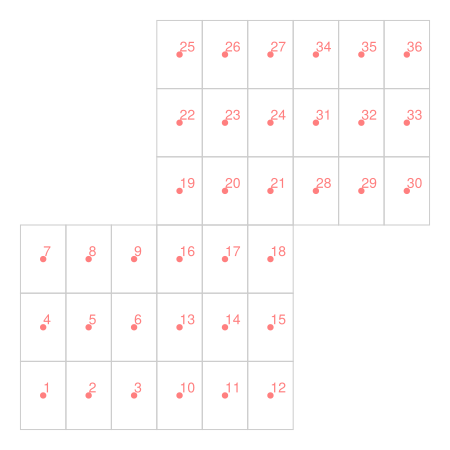
As you can see, the original Tetris-like mask has been split: each original cell is now composed of 3×3 oversampling cells. Note how the cells ids are sorted so that oversampling cells have nearby values: this is very useful in various situations, as it allows one to easily compute properties of oversampled cells. For example, if one stores a vector of surface brightness of an 3-oversampled grid in a vectors sb, the un-oversampled values can be computed as mean(reshape(sb, 9, :), dims=1). Similarly, the original centers of the un-oversampled mask can be computed as mean(reshape(grid.centers, 9, :), dims=1).
Grid refinements
Grid refinement can be carried out using various
In order to better understand the grid properties and the way the refinement acts on them, it is useful to plot an unrefined and a refined grid together with a few debugging information. Consider the following code, taken from the example at the beginning of this page
julia> mask = Bool[1 0; 1 1; 0 1];

julia> grid = Gravity.MaskedGrid(mask, SPoint(0.0, 0.0), SPoint(1.0, 1.0));

julia> Gravity.plotgrid(grid; centers=true, centersann=true, corners=true,
       concersann=true, neighborlines=true, neighborlinesann=true,
       cornerlines=true, cornerlinesann=true)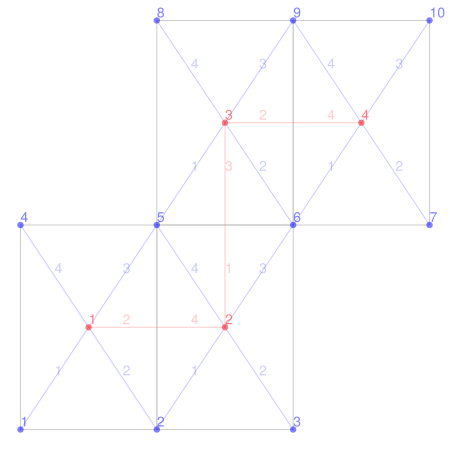
The red dots represent the grid centers, i.e. the vector grid.centers. They are connected by red lines, indicating the neighbors to each center: this information is stored in the grid.neighbors_idx field, a vector that, for each grid center, indicate the id of the neighboring center; neighbors are numerated North-East-South-West, and the corresponding id is vanishing if no neighbor is present. For example:
julia> grid.neighbors_idx[2]
4-element SVector{4, Int64} with indices SOneTo(4):
 3
 0
 0
 1
The blue dots represent the grid.corners: each center has a list of associated corners stored in grid.corners_idx, numbered as shown in the figure (SW-SE-NE-NW). For example:
julia> grid.corners_idx[3]
4-element SVector{4, Int64} with indices SOneTo(4):
 4
 7
 8
 5
Unrefined grids will be quite boring with respect to other fields: the vector grid.levels will be composed of a list of ones and each cell will have the same area, so that the vector grid.areas will be made of identical elements (ones in our example). Let us now refine the grid and plot the result obtained:
julia> Gravity.refine_grid!(grid, [2, 3]);

julia> Gravity.plotgrid(grid; centers=true, centersann=true, corners=true,
       concersann=true, neighborlines=true, neighborlinesann=true,
       cornerlines=true, cornerlinesann=true)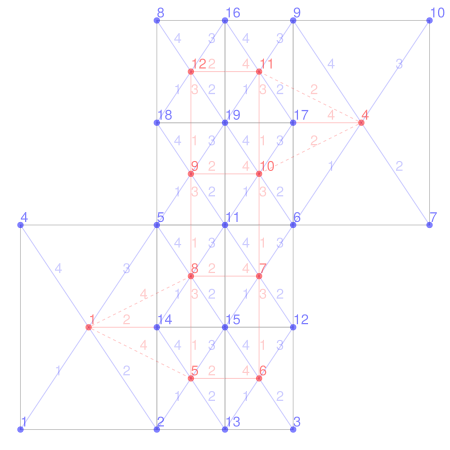
As you can see something interesting happens: a number of new centers and new corners has been created, with all references discussed above correctly updated. Note also that some new centers can have unrefined (or less refined) neighbors, indicated by dashed lines in the figure. These special neighbors are indicated with negative values in the grid.neighboors_idx list: for example,
julia> grid.neighbors_idx[10]
4-element SVector{4, Int64} with indices SOneTo(4):
 11
 -4
  7
  9
Note however that the neighbors of unrefined cells will still point to the old, unrefined centers, and therefore for example grid.neighbors_idx[4][4] == 3. One can find out that a cell has been refined using a number of ways:
- Their areas are set to the negative of the unrefined areas,
grid.areas[3] == -1.0. - Their levels are the negative of the original levels,
grid.levels[3] == -1. - The center ids of the corresponding refined cells can be obtained by looking at the
children_idxvalues, which report, for each center, the id of the South-West refined cell; further refined cells will be just follow. For example, we will havegrid.children_idx[3] == 9, and therefore the refined centers of the old cell n. 3 are (9, 10, 11, 12).
Further properties of refined cells are discussed in Gravity.refine_grid!.
Refinements are often performed in a hierarchical way: at each stage, the points that one can refine all have the maximum refinement level. For example, in our example we could perform a deeper refinement of the cells ids from 5 to 12, but we would be unable to refine cell 1 or cell 4. These refinements can be carried out using Gravity.refine_grid!.
In some cases, however, we will need to refine points that are not at the last refinement level. This operation is more complicated, because one needs to take trace of the already created vertices. Consider the cell 1 in the figure above: if we will refine it, we need to avoid the creation of a new corner 14; we also need to update all neighbors_idx in a consistent way. This task can be accomplished using Gravity.refine_grid_special!:
julia> Gravity.refine_grid_special!(grid, [1]);

julia> Gravity.plotgrid(grid; centers=true, centersann=true, corners=true,
       concersann=true, neighborlines=true, neighborlinesann=true,
       cornerlines=true, cornerlinesann=true)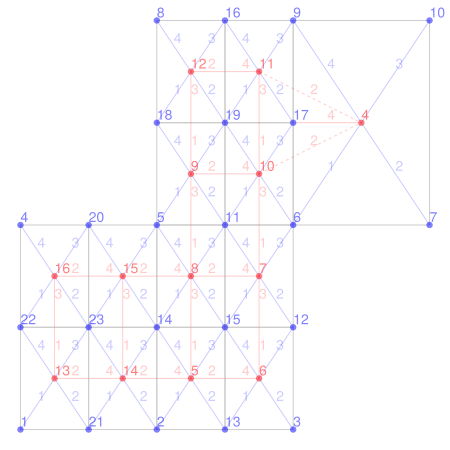
As you can see, new centers are normally created, they are normally linked to the old refined points:
julia> grid.neighbors_idx[8]
4-element SVector{4, Int64} with indices SOneTo(4):
  9
  7
  5
 15

julia> grid.neighbors_idx[15]
4-element SVector{4, Int64} with indices SOneTo(4):
  0
  8
 14
 16
A typical use of this refinement technique is associated to iso-contour refinements, carried out using
julia> grid = Gravity.MaskedGrid(-5:5, -5:5);

julia> paths = Gravity.refine_grid_isocontour!(grid, p->(p[1]^2 + p[2] - 11)^2 + (p[1] + p[2]^2 - 7)^2; maxlevel=4, isocontour=60);

julia> fig = Gravity.plotgrid(grid); ax = current_axis(fig);

julia> for path ∈ paths
           lines!(ax, [v[1] for v ∈ path], [v[2] for v ∈ path]; label="")
       end

julia> fig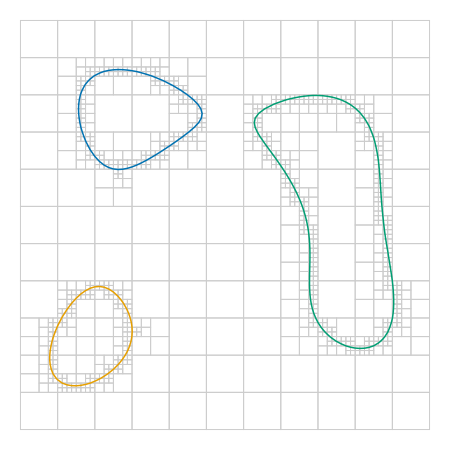
Gravity.subgrid — Function
subgrid(parent, points [, maxlevel])Create a subgrid made by selectiong a set of points from a parent grid.
The new grid has a smaller mask and a different reference point, but the centers agree. Note, however, that the generated subgrid will always have oversampling == 1 even if parent.oversampling > 1: this happens because, in case of oversampling, one might select in points only parts of undersampled cells.
The parameter maxlevel indicates the maximum allowed level of refinement in the subgrid. By default, it is equal to the level of the parent grid. Use maxlevel = 1 to obtain an unrefined subgrid.
Example
julia> parent = Gravity.MaskedGrid(Bool[0 1 1 0; 1 1 1 1; 0 0 1 0], SPoint(0.5, 1.5), SPointMap(1.0, 0.0, 0.5, 2.0));

julia> parent.mask
3×4 Matrix{Int64}:
 0  2  4  0
 1  3  5  7
 0  0  6  0

julia> child = Gravity.subgrid(parent, [5, 3, 6]);

julia> child.mask
2×2 Matrix{Int64}:
 1  2
 0  3

julia> all(parent.centers[child.super_idx] ≈ child.centers)
true

julia> grid = Gravity.MaskedGrid(child);

julia> all(grid.super_idx == child.super_idx)
trueGravity.refine_grid! — Function
refine_grid!(grid, ids)Refine by bisection a MaskedGrid by spliting the points with the ids provided. This procedure computes the new grid centers, corners, corners_idx, areas, and mask_idx (that is, the original arrays are enlarged and the new items are written at the end of them).
This method only works when the refined cells are all at the last grid level. If this is not the case, use refine_grid_special!.
Refining rules
Refined grid points are not deleted from the grid.centers array: this saves us complex and time-consuming computations. Also, it makes easy, if necessary, to unrefine a grid. As a result, new grid points (as well as new corners) are at the end of the array grid.centers (and grid.corners, respectively).
Refined grid points points have the following properties:
- their levels are negative values of the original levels
- their areas are set to the negative of the original values
- the
maskandinv_maskattributes are left unchanged: they essentially refer to the original, unrefined grid - the
mask_idxattribute of the new points will point to original, unrefined id of the corresponding cell - the
neighbors_idxof refined points at the boundary of the refinement will be negative, with values equal to the negative of the ids of the neighbors. - the
neighbors_idxof points outside the refinement will still point to the unrefined centers and will be positive. - the
children_idxattribute of points that will be refined will point to the first cell of the refinement: this is the cell at the lower-left of the refinement; the other refinement cells of the same point will follow in order lower-left, lower-right, top-right, top-left.
Examples
julia> mask = [1 1 0; 0 1 1];

julia> grid = Gravity.MaskedGrid(mask', Gravity.SPoint(0.0, 0.0), Gravity.SPoint(1.0, 1.0));

julia> Gravity.refine_grid!(grid, [2, 3]);

julia> sum(grid.areas[grid.areas .> 0])
4.0

julia> grid.centers
12-element Vector{SVector{2, Float64}}:
 [0.0, 0.0]
 [1.0, 0.0]
 [1.0, 1.0]
 [2.0, 1.0]
 [0.75, -0.25]
 [1.25, -0.25]
 [1.25, 0.25]
 [0.75, 0.25]
 [0.75, 0.75]
 [1.25, 0.75]
 [1.25, 1.25]
 [0.75, 1.25]

julia> grid.corners_idx
12-element Vector{SVector{4, Int64}}:
 [1, 2, 5, 4]
 [2, 3, 6, 5]
 [5, 6, 9, 8]
 [6, 7, 10, 9]
 [2, 13, 15, 14]
 [13, 3, 12, 15]
 [15, 12, 6, 11]
 [14, 15, 11, 5]
 [5, 11, 19, 18]
 [11, 6, 17, 19]
 [19, 17, 9, 16]
 [18, 19, 16, 8]

julia> grid.mask_idx'
1×12 adjoint(::Vector{Int64}) with eltype Int64:
 1  2  3  4  2  2  2  2  3  3  3  3

julia> grid.neighbors_idx
12-element Vector{SVector{4, Int64}}:
 [0, 2, 0, 0]
 [3, 0, 0, 1]
 [0, 4, 2, 0]
 [0, 0, 0, 3]
 [8, 6, 0, -1]
 [7, 0, 0, 5]
 [10, 0, 6, 8]
 [9, 7, 5, -1]
 [12, 10, 8, 0]
 [11, -4, 7, 9]
 [0, -4, 10, 12]
 [0, 11, 9, 0]

julia> grid.levels'
1×12 adjoint(::Vector{Int8}) with eltype Int8:
1 -1 -1 1 2 2 2 2 2 2 2 2refine_grid!(grid)Refine all points of a grid.
This method will refine all points of a grid that are at the lowest refinement level. It is equivalent to refine_grid!(grid, findall(==(gridlevel(grid)), grid.levels)).
Examples
julia> grid = Gravity.MaskedGrid(Bool[1 1 0; 0 1 1]); sum(grid.levels .== 1)
4

julia> Gravity.refine_grid!(grid); (sum(grid.levels .== 1), sum(grid.levels .== 2))
(0, 16)

julia> Gravity.refine_grid!(grid); (sum(grid.levels .== 1), sum(grid.levels .== 2), sum(grid.levels .== 3))
(0, 0, 64)Gravity.refine_grid_special! — Function
refine_grid_special!(grid, ids)Refine by bisection a MaskedGrid by spliting the points with the ids provided.
This procedure computes the new grid centers, corners, corners_idx, areas, and mask_idx (that is, the original arrays are enlarged and the new items are written at the end of them). It differs from refine_grid! in that the refinement cells need not to be all at the last level: one can instert in ids any combination of unrefined cells. This gives a lot of flexibility in the refinement, at the cost that
This procedure is somewhat slower than
refine_grid!The refinements are not ordered anymore: cells at level ℓ′ > ℓ are not necessarly stored after cells at order ℓ. This creates issues with
unrefine_grid!, which assumes the levels are stored in increasing order.
Refining rules
Refined grid points are not deleted from the grid.centers array: new grid points (as well as new corners) are at the end of the array grid.centers (and grid.corners, respectively).
Refined grid points points have the following properties:
- their levels are the negative values of the original levels
- their areas are set to the negative of the original values
- the
maskandinv_maskattributes are left unchanged: they essentially refer to the original, unrefined grid - the
mask_idxattribute of the new points will point to original, unrefined id of the corresponding cell - the
neighbors_idxof refined points at the boundary of the refinement will be negative, with values equal to the negative of the ids of the neighbors.
Examples
julia> mask = Bool[1 1 0; 0 1 1];

julia> grid = Gravity.MaskedGrid(mask, Gravity.SPoint(0.0, 0.0), Gravity.SPoint(1.0, 1.0));

julia> @assert Gravity.refine_grid_special!(grid, []) === grid

julia> Gravity.refine_grid!(grid, [2, 3]);

julia> Gravity.refine_grid_special!(grid, [1, 5]);

julia> sum(grid.areas[grid.areas .> 0])
4.0

julia> grid.levels'
1×20 adjoint(::Vector{Int8}) with eltype Int8:
-1 -1 -1 1 -2 2 2 2 2 2 2 2 2 2 2 2 3 3 3 3refine_grid_special!(grid)Refine all points of a grid.
This method will refine all valid points of a grid. It is equivalent to refine_grid_special!(grid, findall(>(0), grid.levels)).
Examples
julia> grid = Gravity.MaskedGrid(Bool[1 1 0; 0 1 1]);

julia> Gravity.refine_grid!(grid, [2]); (sum(grid.levels .== 1), sum(grid.levels .== 2))
(3, 4)

julia> Gravity.refine_grid_special!(grid); (sum(grid.levels .== 1), sum(grid.levels .== 2), sum(grid.levels .== 3))
(0, 12, 16)Gravity.refine_grid_positions! — Function
refine_grid_positions!(grid, positions; maxlevel=...)Refine the grid a the given positions up to maxlevel.
This procedure performs a series of refinements of grid at the cells containing the specified positions until the cells reach a refinement level maxlevel (by default just one higher level with respect the current grid-level).
The procedure calls as appropriate refine_grid! or refine_grid_special!.
Gravity.refine_grid_isocontour! — Function
refine_grid_isocontour!(grid, f; [maxlevel=gridlevel(grid) + 1, isocontour=0])
refine_grid_isocontour!(grid, values, f; [maxlevel=gridlevel(grid) + 1, isocontour=0])
refine_grid_isocontour!(grid, values [, :interpolation]; [maxlevel=gridlevel(grid) + 1, isocontour=0])
Compute the isocontour (contour level) of a function within a grid, with optional refinement.
This method can be called in various forms, depending on the kind of operation desired. In the first two versions, the calling sequence requires the use of a function f that maps grid points (in particular, grid corners) into scalar real values. If available, the initial evaluations of f at the grid corners can be provided in the values array; in that case, if a refinement is requested (see below), the array will be updated accordingly.
In the last version, the method uses bilinear interpolation within each grid cell: this is the default if no function has been provided.
If desired, the grid will be refined close to the isocontour up to the provided maxlevel: the default is to operate just a single refinement, i.e. to have maxlevel = gridlevel(grid) + 1. If, instead, one sets a maxlevel smaller or equal than gridlevel(grid), it is guaranted that the grid will not be modified, and the contours will be computed at the available resolution.
Finally, the keyword isocontour controls the contour level to use (by default, it is set to zero).
Algorithm
This function uses the marching squares algorithm. The only significant complication is due to the fact that the grid might have different cell sizes. For this reason, the marching square is associated with a possible refinement, in case during the chasing of an isocontour we jump to cells that have lower resolutions.
Example
julia> f(p) = cos(p[1])*cos(p[2])
f (generic function with 1 method)

julia> grid = Gravity.MaskedGrid(-5:5, -5:5);

julia> paths = Gravity.refine_grid_isocontour!(grid, f; maxlevel=4, isocontour=0.3);

julia> plotgrid(grid)

julia> for path ∈ paths
       plot!([v[1] for v ∈ path], [v[2] for v ∈ path]; label="")
       end

julia> gui()
Gravity.unrefine_grid! — Function
unrefine_grid!(grid, level)Unrefine the MaskedGrid grid back to the level.
This method undos the action performed by refine_grid!: it restores a grid to status where all sub-cells at levels higher than level are deleted. All relevant grid attributes are restored.
If one needs to perform several grid refinements each time starting from the same unrefined grid, it is generally faster to use unrefine_grid! rather than starting each time from a copy of the original unrefined grid. This happens because in the first case the vectors with the various grid attributes are enlarged and shrinked several times, an operation that effectively does not require many memory allocations.
!!! warning This procedure will roll-back the grid to the state the grid had at the given level. In case one has used refine_grid_special!, the levels of the refinements are not guaranteed to be sorted. As a result, a call to unrefine_grid! would cut the grid to the first cell with a refinement larger than level.
Grid cell discovery
Gravity.sidecorners — Function
sidecorners(grid, cell_id [, side])Return all corner ids of a given grid cell.
Optionally, only returns the corner ids of a given side. Sides are numbered in the order South (1), East (2), North (3), and West (4).
See also: sidecorners!.
Examples
julia> mask = Bool[1 1 0; 0 1 1];

julia> grid = Gravity.MaskedGrid(mask, SPoint(1.0, 1.0), SPoint(2.0, 2.0));

julia> Gravity.refine_grid!(grid, [2]);

julia> grid.corners[Gravity.sidecorners(grid, 1)]
5-element Vector{SVector{2, Float64}}:
 [0.0, 0.0]
 [2.0, 0.0]
 [2.0, 2.0]
 [1.0, 2.0]
 [0.0, 2.0]

julia> grid.corners[Gravity.sidecorners(grid, 3)]
5-element Vector{SVector{2, Float64}}:
 [2.0, 2.0]
 [4.0, 2.0]
 [4.0, 4.0]
 [2.0, 4.0]
[2.0, 3.0]Gravity.sidecorners! — Function
sidecorners!(indices, grid, cell_id, side)Return the corners ids corresponding to a side of a the cell_id.
This procedure appends the corners ids to the indices vector. The corners added are the first one of the side, all corners created by possible refinements of the grid cell or of the neighbor grid cell, up to the last corner. This is not included in indices, because it is shared with the next side.
The sides are sorted according to the corners: South, East, North, West.
A typical use would call this method four times for all sides in turn, so that at the end indices is the complete list of corners of a cell.
Gravity.sidecrossing — Function
sidecrossing(point, grid, cell_id, side, mapped_corners)Computes the crossing index of point with respect to a given grid cell side.
The crossing index is the number a ray originating from point and directed to the East crosses the mapped cell border. For this method, we only conside a given side of the cell. The array mapped_corners is taken to contain the mapping of the grid.corners.
This method, applied to all cell sides, allow one to discover if a given point is within the bondaries of a cell.
Gravity.isinside_gridcell — Function
isinside_gridcell(point, grid, cell_id, mapped_corners)Check if a point is within the mapped_corners of a given grid cell.
This method calls sidecrossing for all sides of cell_id, then checks that the total number of crossings is odd.
For unrefined cells with unrefined neighbors (that is, cells with children_idx = 0) it is faster to use isinside.
Gravity.inversegrid — Function
inversegrid(point, grid [, mapped_corners]; quadrilaterals = false, startpoint = 1)Return the indexes of the mapped grid cells that contain point.
This function iterates over all grid cells and considers the mapped_corners associated to each each. If point is inside a side, the cell index will be included in the final result.
By default, this method checks neighbors refinements: if a cell has a refined neighbor, the additional midpoint (and, eventually, further points) along the common side are considered. However, if the keyword quadrilaterals is set to true, all cell are taken to be quadrilateral, and no checks for refined neighbors are performed. This makes the method faster.
The keyword startpoint indicate the first grid center to consider: it is by default unity, but can be set to a higher value (useful in case one needs to check only the refined points of a grid).
To find a better approximation, one can then pass each index returned by this function to inversegridpoint.
Gravity.inversegrid_fast — Function
inversegrid_fast(point, grid, mapped_corners; startpoint = 1)Return the indexes of the mapped grid cells that contain point.
This function iterates over all level 1 grid cells and considers the quadrilaterals formed by the mapped_corners of each cell. If point is inside a quadrilateral, the function iteratively checks all the refinements of the cell. The index of the final unrefined cell containing the point will be included in the result.
This algorithm is faster than the one used in inversegrid, but it does not guarantee to find all cells: the problem is that a level 1 cell might apparently not include the point, but their refinements would do. In a sense, the use of the algorithm implemented in this method makes it useless to perform refinements for non-linear mappings. It makes sense, however, to use this function for unmapped or linearly mapped corners.
The keyword startpoint indicate the first grid center to consider: it is by default unity, but can be set to a higher value (useful in case one needs to check only the refined points of a grid).
To find a better approximation, one can the pass each index returned by this function to inversegridpoint.
Gravity.inversegridpoint — Function
inversegridpoint(point, grid, mapped_corners, idx)Perform a linear approximation to find the inverse of a point in a grid.
This function takes a grid, the vector of grid's mapped corners mapped_corners, a point in the mapped space, and the index idx of a cell that, when mapped, contains the point, and return the linearly-approximated inverse point x, i.e. the point that, within a linear approximation, would be mapped to point.
Typically, this function is called for each index returned by inversegrid.
Gravity.inversegridpoints — Function
inversegridpoints(point, grid, mapped_corners; kw...)Finds all approximate inverses of a point, given a mapped grid.
This routine is equivalent to
inversegridpoint.(point, grid, mapped_corners, inversegrid(point, grid, mapped_corners))Other grid methods
Gravity.addflux! — Function
addflux!(image, grid, flux)Given a vector of flux values computed for each pixel of grid, this function update image by adding the various fluxes at the correct pixels of image, combined according to the grid. This function fully support multi-resolution grids.
Examples
julia> supergrid = Gravity.MaskedGrid([0 1 2; 3 4 0]); grid = copy(supergrid);

julia> Gravity.refine_grid!(grid, [2, 3]); Gravity.refine_grid!(grid, [7, 8, 9]);

julia> grid = Gravity.MaskedGrid(Bool[0 1 0; 1 1 1], Gravity.SPoint(0.0, 0.0), Gravity.SPoint(1.0, 2.0));

julia> Gravity.refine_grid!(grid, [2,3]);

julia> flux = [1.0, 1.0, 1.0, 2.0, 0.3, 0.4, 0.5, 0.2, 0.6, 0.2, 0.4, 0.8];

julia> image = zeros(2, 3);

julia> Gravity.addflux!(image, grid, flux)
2×3 Matrix{Float64}:
 0.0  0.7  0.0
 2.0  1.0  4.0

julia> sum(Gravity.addflux!(zeros(2, 3), grid, flux)) == sum((grid.areas .* flux)[grid.areas .> 0])
trueGravity.nonlinearity — Function
nonlinearity(grid, mapped_corners)Compute the non-linearity of each point of grid.
mapped_corners is a vector of points, representing the mapped positions of each grid.corner with a possibly non-linear function f: ℝ² to ℝ².
A purely linear (or affine) operator maps rectangles into parallelograms, and therefore in this case the centers of such quadrilateral obtained from the mid-points of the two diagonals will coincide. A non-linear operator might introduce effects that will displace the two centers from one to another.
Assuming that the function f has the Taylor's expansion
fᵢ(x) = Aᵢ + Bᵢⱼ xⱼ + ½ Cᵢⱼₖ xⱼ xₖ + ...
this function will return, in case of a unit square as a quadrilateral, the quantity (C₁₁₂ + C₁₂₁, C₂₁₂ + C₂₂₁). Since Cᵢⱼₖ = Cᵢₖⱼ by construction, the returned quantity is effectively 2(C₁₁₂, C₂₁₂). Hence, his function is only sensitive, to second order, to mixed terms like x₁x₂, and not all forms of non-linearity can be identified with this technique: for example the function f defined as f(x) = (x₁², x₂²) would result in a vanishing nonlinearity
Note, however, that this is the best we can do with just a quadrilateral: the constants Aᵢ and Bᵢⱼ requires in total 6 data, and since a quadrilateral provides 2 × 4 data, we are left with just 2 data, corresponding to the combination of the C coefficients written above.
Examples
julia> grid = Gravity.MaskedGrid(Bool[1 1 0; 0 1 1]);

julia> @assert all(Gravity.nonlinearity(grid, (x -> 2x .+ 0.3).(grid.corners)) .== Ref(SPoint(0.0, 0.0)))

julia> Gravity.nonlinearity(grid, (x -> SPoint(x[1]^2 + x[2]^2, 2*x[1]*x[2])).(grid.corners))
4-element Vector{SVector{2, Float64}}:
 [0.0, -1.0]
 [0.0, -1.0]
 [0.0, -1.0]
[0.0, -1.0]Gravity.nonlinearity! — Function
nonlinearity!(result, grid, mapped_corners)In-place version of nonlinearity.
result must be an already-allocated vectors of points; it can be allocated with result = similar(grid.centers).